How to Create a Shift Schedule: Step-by-Step Guide with Example, Tools and Pitfalls
Create a shift schedule with confidence: preparation, step-by-step guide, tool comparison (paper, Excel, software) and a practical example for medical practices, clinics and therapy teams. Includes checklist, employment-law pitfalls and fairness tips.
Table of Contents
You're sitting in front of an empty weekly plan, you have 6 employees, 3 shifts per day, 2 vacation requests, 1 sick note. The whole thing has to be done by Friday, fair, legally compliant and without double bookings. If that sounds familiar, you're not looking for theory but for a process that works. That's exactly what this article is for. We'll walk through how to create a shift schedule step by step: what you have to know in advance, what the concrete workflow looks like, which tool to use (paper, Excel or software) and where the most common pitfalls hide. By the end you'll have a checklist you can apply on Monday morning.
Key takeaways at a glance
- To create a shift schedule, don't start in Excel. Start with three inputs: staffing need per shift, your team's availabilities, and statutory limits (rest periods, weekly maximum hours, breaks).
- Solid shift planning breaks down to five steps: clarify need → define shifts → assign employees → check conflicts → publish and communicate.
- Anyone who wants to build a shift schedule themselves should plan at least 2 weeks of lead time. There is no general statutory notice period in Germany, but collective and individual agreements frequently set one.
- Excel is fine for 3–5 employees, becomes a source of errors from 8 employees onwards. Specialised software checks rest periods and double bookings automatically and gives employees access via an app.
- Shift planning is not about "filling gaps" but about making fairness visible: who last worked a weekend, who is on early shift unusually often? That question decides whether the team accepts the plan.
How to create a shift schedule: what to clarify before the first entry
Before you enter a single shift, three things have to be clear. Skipping this step means building the schedule on sand: every correction later will eat up twice the time of a clean preparation.
Staffing need per shift
Write down, for every shift on a typical day, which role needs how many people. In a medical practice that might look like this:
- Early shift (7:00 a.m. to 1:00 p.m.): 1 medical assistant at reception, 1 in the treatment room, 1 in the lab → 3 people
- Late shift (1:00 p.m. to 6:00 p.m.): 1 at reception, 1 in the treatment room → 2 people
- On-call day: additionally 1 medical assistant for standby duty
This table is your target picture. Only once the target is clear can you assess whether your current headcount is enough, or whether you're structurally understaffed and no shift schedule in the world can fix that.
Availabilities, vacation requests, blocked times
For the planning window (typically 4 weeks), collect all absences and requests in one place:
- Approved vacation, training days, known medical appointments
- Recurring blocked times (childcare on Tuesdays after 2 p.m., elder care on Fridays, etc.)
- Part-time staff and their contracted weekdays
If this lives across WhatsApp messages, sticky notes on the fridge and Outlook calendars, you've already lost when creating the shift schedule. Consolidate the data in one place before you start.
Employment-law limits
Three hard limits from the German Working Hours Act (ArbZG) always apply, no matter how tight the schedule:
- 11 hours rest period between two shifts (exceptionally 10)
- Maximum 48 hours per week averaged over 6 months (short-term up to 60 hours)
- Breaks: 30 min for more than 6 hours of work, 45 min for more than 9 hours
These rules are not suggestions: a shift schedule that violates them without a permitted exception carries a fine (section 22 ArbZG), and the individual instruction may not bind the employee. Collective bargaining agreements (e.g. the framework agreement for medical assistants) are usually stricter, but section 7 ArbZG permits exceptions, even shorter rest periods. Check yours. Anyone who wants to build a shift schedule themselves has to know these limits or use a tool that warns automatically.
Step-by-step guide: How to create a shift schedule
When the preparation is done, you can build the actual schedule. The process breaks down into five clear steps.
Step 1: Define shifts and roles
Decide which shift types actually exist: early shift, late shift, split shift, on-call, floater. Each shift type has a fixed time window and a fixed role list (e.g. "Late shift = 1 reception + 1 treatment room"). These shifts become your building blocks. Later you only fill them with names.
Step 2: Assign employees (by rotation, not by gut feeling)
Place employees into shifts. Three principles help avoid conflict:
- Rotate unpopular shifts (Saturdays, late shifts): everyone takes them equally often
- Wishes first, gaps last: respect blocked times first, then fill the open slots
- Clear floater logic: one employee is the "floater" each week for unplanned absences (that prevents last-minute calls to everyone)
Here is what that looks like filled in: the point where theory turns into a plan you can post on Monday. The practice from the example above has 6 medical assistants, an early shift from 7:00 a.m. to 1:00 p.m. (6.0 hours, 3 people) and a late shift from 1:00 p.m. to 6:00 p.m. (5.0 hours, 2 people), Monday to Friday. That comes to 15 early and 10 late shifts per week, 140 hours in total to spread across six people:
| Assistant | Mon | Tue | Wed | Thu | Fri | Shifts | Hours |
|---|---|---|---|---|---|---|---|
| Anna | E | E | L | E | E | 4E + 1L | 29.0 |
| Bilal | E | L | E | E | L | 3E + 2L | 28.0 |
| Clara | E | E | E | L | – | 3E + 1L | 23.0 |
| Dana | L | E | – | E | E | 3E + 1L | 23.0 |
| Erim | L | – | L | L | E | 1E + 3L | 21.0 |
| Frauke | – | L | E | – | L | 1E + 2L | 16.0 |
| Staffing | 3E/2L | 3E/2L | 3E/2L | 3E/2L | 3E/2L | 25 | 140.0 |
E = early shift (6.0 h), L = late shift (5.0 h), dash = off. Check any row yourself: Anna works 4 × 6.0 + 1 × 5.0 = 29.0 hours, Erim 1 × 6.0 + 3 × 5.0 = 21.0 hours. The bottom row shows that every single day is staffed with exactly three early and two late people: no day is short, none is overstaffed.
Two things about this plan matter more than the distribution itself. First, Frauke is the floater this week because she has Monday and Thursday off and could genuinely step in when someone calls in sick: the floater is not an honorary title, it is someone with free days. Second, Erim has the least popular week in the team with three late shifts; that belongs in the rotation counter and gets balanced out the following week. This is precisely where your team decides whether it considers the plan fair.
Step 3: Check and resolve conflicts
Before you publish, walk through the schedule row by row and check:
- Does everyone have at least 11 hours rest between two shifts?
- Are double bookings ruled out (nobody is in two shifts simultaneously)?
- Are weekly hours per employee within the target, not far over, not far under?
- Is every mandatory role staffed (e.g. "lab" on Wednesday)?
This is the most time-consuming step when you want to build a shift schedule yourself. In Excel you hunt these conflicts with your eye. This is where modern software shows the biggest efficiency gain.
Four pitfalls come up again and again when you create a shift schedule, and three of them are invisible in the finished plan:
Rest periods across the day boundary. In the example plan above the late shift ends at 6:00 p.m. and the early shift starts at 7:00 a.m., which leaves 13 hours of rest, comfortably clear. Move the late shift to 8:00 p.m. and you are at exactly 11 hours, right on the limit set by the German Working Hours Act (ArbZG); at 8:30 p.m. it is 10.5 hours, permissible only where section 5 (2) ArbZG or a collective agreement allows it for your facility and the time is compensated. Always check late-to-early transitions across midnight, not just within a single calendar day.
Target hours against the contract, not against the average. Frauke sits at 16.0 hours in the example. On a 20-hour contract that is a 4-hour shortfall for the week, and it accumulates in the overtime account. Anyone looking only at the team's weekly total (140 hours, looks right) will miss it: the deviation happens per person, not in the aggregate.
Public holidays inside the planning week. When a public holiday falls in the week, demand drops by a day, but your employees' contractual target hours do not automatically drop with it. The plan then looks finished and balanced while the hours are booked wrong. When you create a shift schedule for a week with a public holiday, plan it separately instead of copying the standard week.
The unwritten rotation counter. If nobody tracks who worked late shifts how often, memory decides after three months, and the memory of those affected is reliably inaccurate. One counter column per quarter costs five minutes and ends the argument.
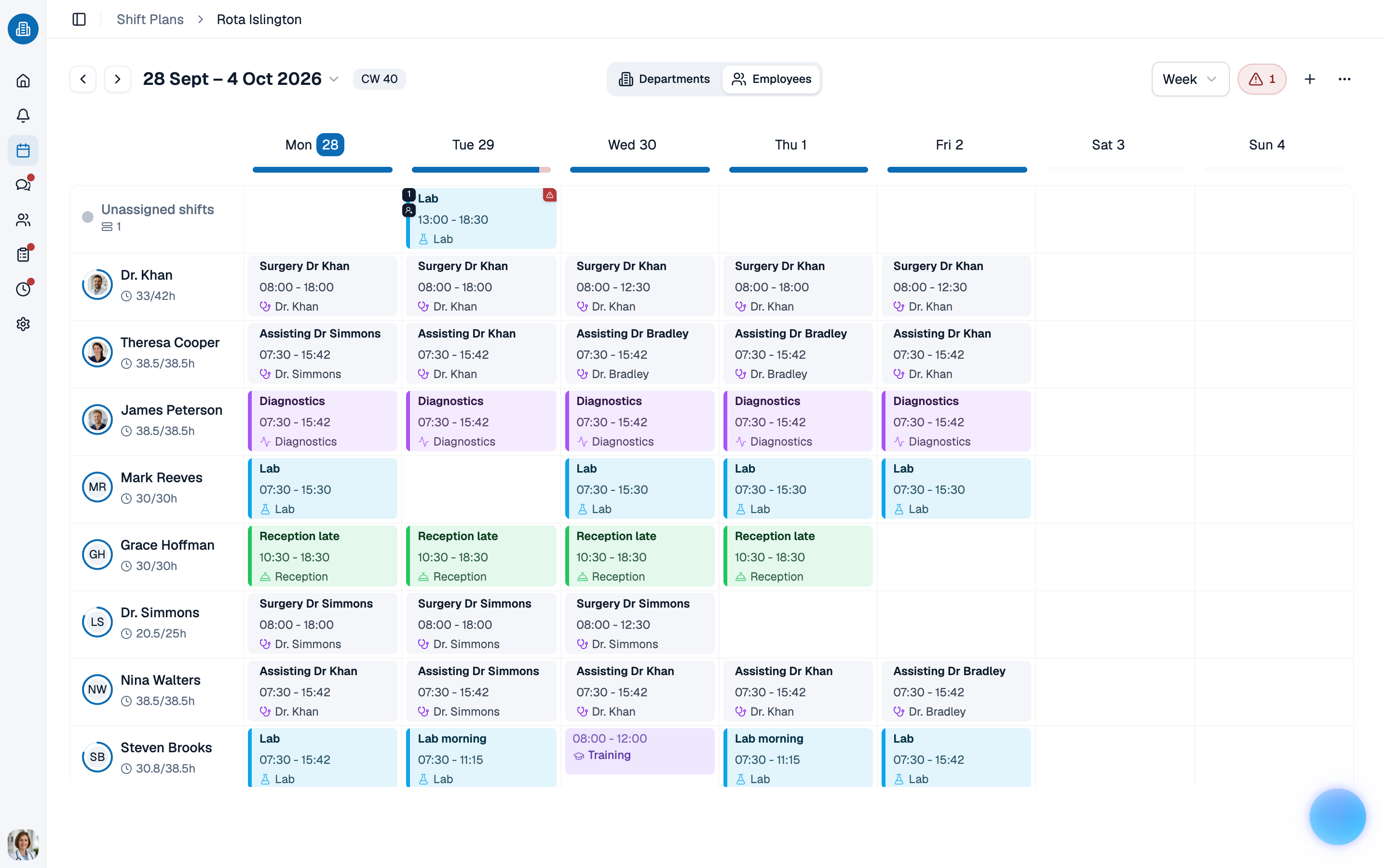 With medishift you build the weekly schedule via drag-and-drop and see conflicts immediately. Try it for free!
How to create a shift schedule that fits the team: tools and acceptance
The question "how to create a shift schedule" is often asked technically. In reality, two dimensions decide whether your plan works: acceptance in the team and the chosen tool. The two are more closely linked than people assume: a tool that makes fairness visible is half the battle for acceptance.
How do you create a shift schedule the team accepts?
Three levers determine acceptance, far more than the tool you choose. When these three points are in place, you'll stop hearing schedule debates in the break room.
Transparency about fairness. Make visible who works Saturdays, late or on-call shifts how often. A simple counter table per quarter takes the wind out of every suspicion. If one person had 12 Saturdays and the next only 4, that's not an occasion for conflict, it's the basis for the next rotation. Whoever tries to create a shift schedule without keeping this statistic in the background runs into every acceptance conflict blind.
Early publication. As soon as the schedule is final, publish it. There is no general statutory notice period under German law: it becomes binding only through a collective or works agreement or the employment contract; otherwise the employer's reasonable discretion under § 106 GewO applies. Two weeks of lead time is the established rule of thumb, four weeks is golden. A schedule that arrives Friday for Monday demotivates even the best team and is questionable if challenged.
Collecting requests in advance. Don't collect shift requests ad hoc via WhatsApp, but in a fixed weekly window (e.g. "Please send requests by Thursday of the previous week"). That way you can compare requests against each other and prioritise fairly, instead of planning on a first-come-first-served basis.
Paper, Excel or software: which tool to use when you build a shift schedule yourself
There are basically three ways to create a shift schedule. Which one fits depends on team size, how often things change, and how many people need to access the plan simultaneously.
Paper or pinboard. Works for mini teams up to 3 people. Pro: maximum overview for those directly involved, no learning curve. Con: no history, no access from home, every sickness means manually rewriting and re-photographing for everyone.
Excel template. The classic for 4–8 employees. Pro: free, customisable, familiar. Con: no automatic check for rest periods or double bookings. Anyone wanting to assemble the schedule themselves checks every rule manually, which is costly and error-prone. Your team has no mobile access either; every change has to go out as a new file, and version chaos is built in.
Specialised shift scheduling software. From around 6–8 employees the switch pays off. A solution like medishift offers:
- Automatic warnings for rest-period violations and double bookings, plus a weekly-hours indicator that colour-codes full capacity
- A mobile app where employees see their schedule at any time
- Vacation and absence tracking that feeds directly into the shift schedule
- An overtime account calculated automatically from published shifts plus absences
- An automatic notification as soon as a shift is published
You trade a one-off learning effort for recurring time savings. Anyone planning monthly recovers that effort within two to three planning cycles.
Checklist: 5 items before you publish the plan
Before you hand the finished plan to the team, work through this list, no matter which tool you're using:
- Are all mandatory roles staffed per shift?
- Does everyone have at least 11 hours rest to the previous shift?
- Are weekly hours within the contracted band (not 38h on a 30h contract, not 22h on a 30h contract)?
- Are approved vacations and known blocked times respected?
- Is the rotation of unpopular shifts fair, so no person two Saturdays in a row when others have had months off?
Ticking these five questions before publishing removes the basis for most later corrections.
Conclusion: Create a shift schedule without pitfalls
To sum up: when you build a shift schedule yourself, the result is not a question of the tool but of preparation. Anyone who has cleanly documented staffing needs, availabilities and employment-law limits can build the schedule in one hour, whether in Excel or in software. Without that, you sit at it for three hours and send corrections on Sunday. Systematic shift planning saves hours per week and, more importantly, saves conflict in the team. The difference between an accepted plan and one the practice keeps wrestling with rarely lies in the details, but almost always in the basics: clear shifts, visible fairness, sufficient notice, and a tool that grows with team size.
If you regularly have to create a shift schedule, the wider context is in our overview of shift scheduling software for practices. Which shift system (two, three or five-shift operation) actually fits your practice is covered in the article on common shift models; if you would rather start without software, pick one of our free templates.
When your team has grown and Excel starts to feel cramped, take a calm look at medishift. Drag-and-drop weekly schedule, automatic rule checking, employee app and overtime account in a single tool, built specifically for medical teams. Your next shift schedule could then be done by Thursday instead of Sunday evening.