
Scheduling for your pharmacy
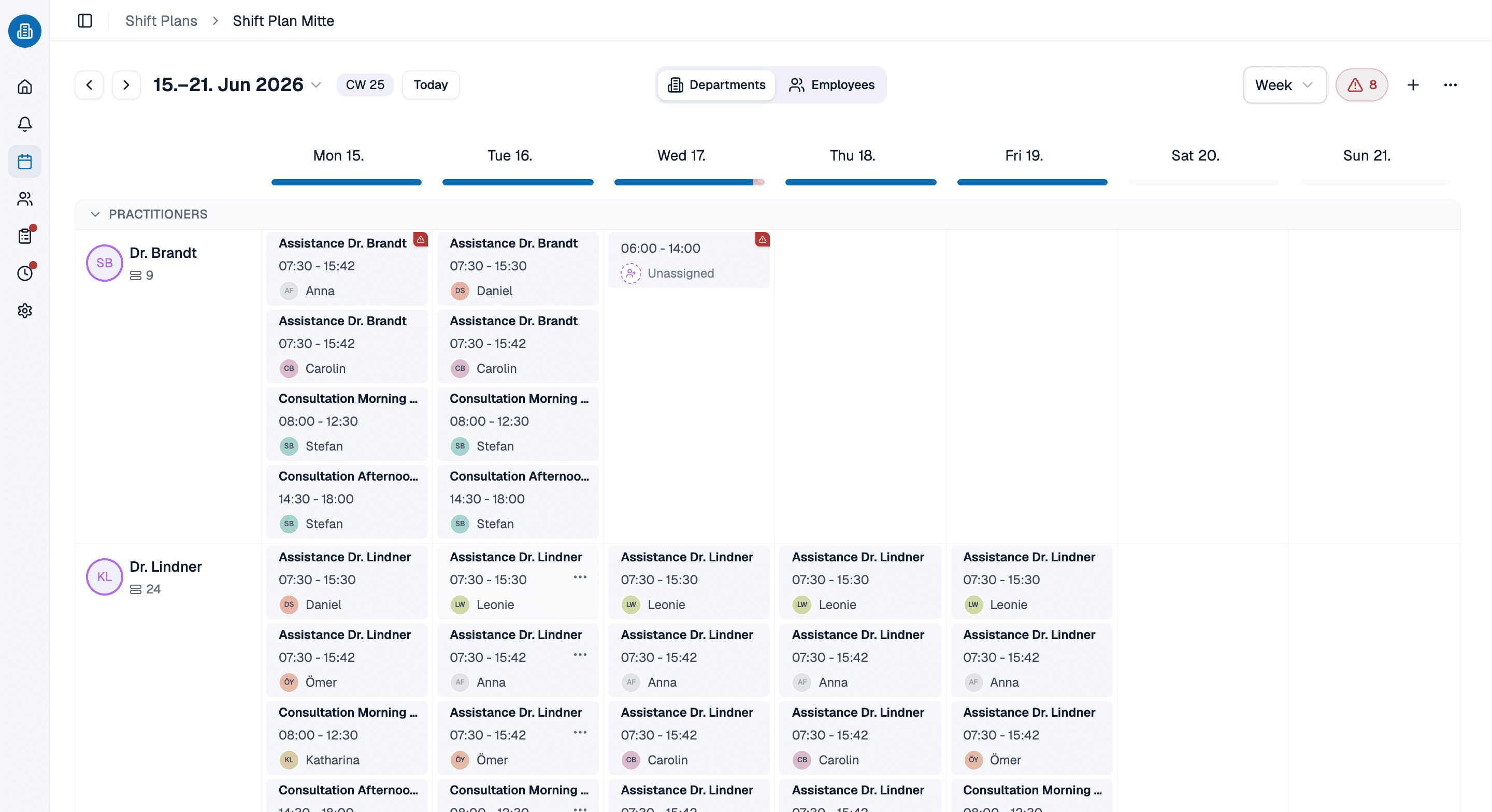
Pharmacy scheduling software that treats on-call, night and weekend duty as shift types of their own. As you assign a shift, medishift checks for double bookings and absences, across every branch you run.
- Custom shift types for on-call, night and weekend duty
- The conflict check reports double bookings and absences as you assign
- Several branches in one account, each with its own departments
More than 100 practices already trust medishift






From shift types to the phone in your team's pocket
Before and after
Without a digital plan in the pharmacy
- The plan hangs in the back office and holds until someone overwrites it.
- On-call duty is a note in the margin rather than a shift.
- Double bookings only surface on the morning of the shift.
- Every branch keeps a spreadsheet of its own.
- Anyone who wants to know their shift rings the pharmacy.
With pharmacy staff scheduling from medishift
- One state, visible to leadership and team, on every device.
- On-call and night duty are shifts of their own, ready to be covered.
- The conflict check reports itself as you assign.
- Every branch sits side by side in one account.
- Everyone sees their own shifts in the app.
Who is this for?

The pharmacy on the high street
One team covering counter, dispensary and on-call duty side by side, without wearing anyone out.

Branch groups
Several sites, shared cover and the standing question of who is working where this week.

Hospital pharmacies
Departments with hours of their own, in an operation that carries on through nights and weekends.

Mail order pharmacies
Picking and advice in shifts, with peaks that pay no attention to opening hours.
Every employee, every branch, one list
Roles, departments and status sit with the person rather than in a second spreadsheet. Whoever covers at a branch stays the same person in the plan and in the conflict check.
- Roles and departments belong to the person, not to the site.
- Fixed working times are on file and checked as you plan.
- The status shows who is active and who has been archived.
A shift becomes working time
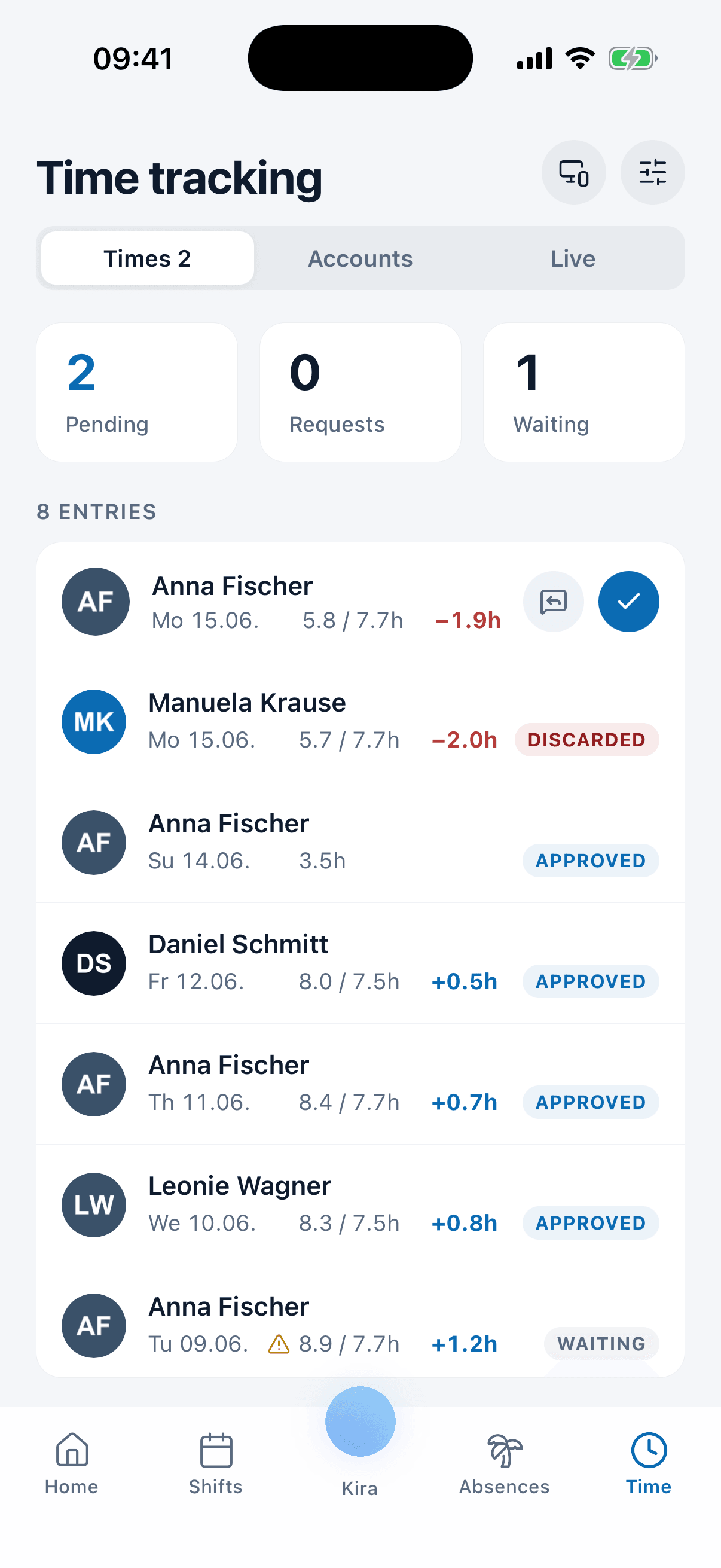
The night duty that ran long shows up as a plus hour in the account instead of on a slip of paper. Target and actual sit side by side per day, and approval happens in the same list.
- Target against actual sits side by side per day and per person.
- Plus and minus hours flow into the overtime account by themselves.
- Approval happens in the same list.
Let us show you the schedule in 30 minutes
We will show you how shift types, conflict checks and branches work together in your pharmacy. Pick a slot, we will take care of the rest.
- 30 minutes
- Via Google Meet
- Free and without obligation
1. Pick a slot
All times in Europe/Berlin.
Sunday, September 20
Frequently asked questions about pharmacy scheduling
Yes. You plan shifts by drag and drop, create departments such as counter and dispensary, and manage your team's absences in one place, without a spreadsheet.
Yes. On-call, night and weekend duty are shift types you define with hours of their own. That makes them coverable shifts in the weekly plan rather than a note in the margin.
As you assign a shift, medishift checks automatically for double bookings, recorded absences and stated unavailabilities. The warning arrives there and then, not on the day of the shift.
Yes. Main pharmacy and branches live in one account, each with its own departments and shift plans. Someone who works at two sites remains a single person throughout.
Through the mobile app. Your staff see their shifts there, apply for open duties, submit vacation requests and state when they are unavailable.
For teams of up to ten employees medishift is free forever, including the schedule, absences and the mobile app. You do not need payment details for it.